Referrals, brokers, luck.Or a system.
Your own list from 700M+ B2B records. Outreach on email and LinkedIn. The rebuttal one click away. AI buyers for practice. One workspace.
Throw your hardest objection at our AI. Or book 30 minutes with Emil, our founder.
Growth on purpose runs on:
- B2B records to search
- 700M+
- Channels in one workspace
- Phone, email, LinkedIn, inbox
- AI buyer personas
- 11Beginner to nightmare
- Per mailbox, cold email send limit
- 40 to 50 a day
Built for serious BPO growth
The fastest-growing BPOs stopped treating referrals and bought lists as a strategy. They built a system. Finding the next client became a job, not a lucky break. Built for mid-market to enterprise BPOs.
01CEOs, founders and VPs of operations
One anchor client shouldn’t decide your year.
Referrals and one big contract make a fine origin story and a fragile pipeline. Lose the contract and the floor goes quiet. Own the pipeline instead, built from buyers you found.
02Sales and business development leaders
Shared lists turn every deal into a price war.
Work from the same list as every competitor and the buyer hears the same pitch on repeat, then picks the cheapest. Build your own list and start the conversation before the price war does.
03Floor supervisors and training leads
Stop letting new hires learn on paid leads.
QA hears a small sample, after the fact. New hires learn on client leads, at client expense. Here they practice on AI buyers first, while you listen in, whisper and read the scorecard.
From borrowed pipeline to your own
The usual BPO sales stack: a data tool, a dialer, an email tool, LinkedIn, an inbox, a training deck, and the spreadsheet holding it all together. Here it’s four steps in one workspace.
Find
Stop sharing buyers with every competitor. Describe yours to AI, preview the matches free, and split the leads across your reps.
- Describe your buyer
- Free preview
- Split across reps
Real screens. No mockups.
Every tool below shares one workspace and one lead record. Nothing to export or re-type between tools.
01 / 08Lead Finder
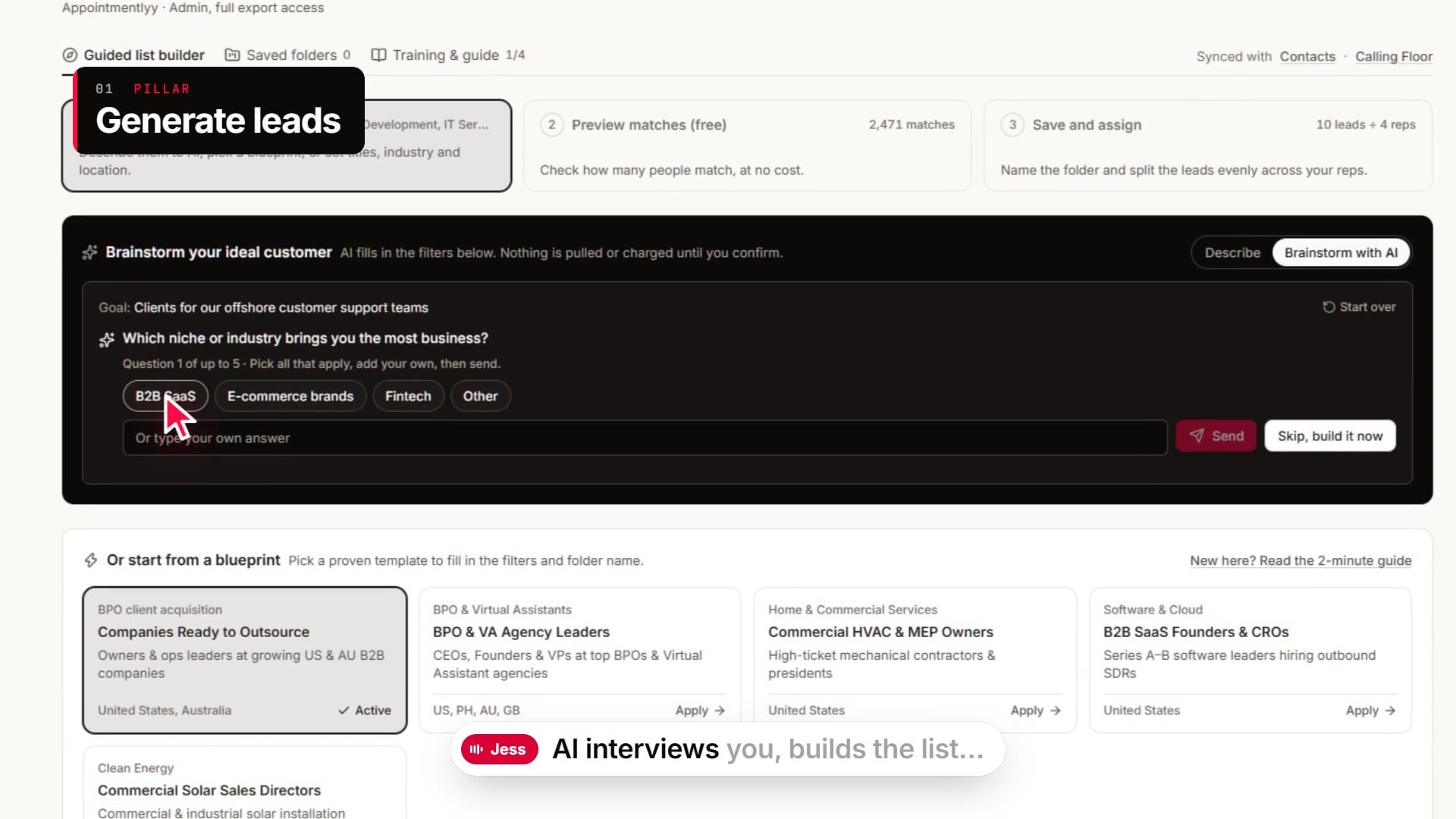
Describe your buyer. Get the list.
Type who you sell to in plain words. AI fills in the filters. Nothing is pulled or charged until you confirm.
- Describe or pick a blueprint: write your ideal customer, or start from a ready-made template such as BPO and VA leaders.
- Preview free: see how many people match and look at sample profiles before you spend a cent.
- Save and assign: name the folder and split the leads evenly across your reps.
Your own list from 700M+ B2B records. Not the one every competitor bought last quarter.
02 / 08Dialer
The script stays on screen. The rep stays on message.
Reps call from a 4-step teleprompter playbook and log the outcome in one click.
- 4-step playbook: opener, problem, solution and close, in type big enough to read mid-call.
- Objection chips: tap “No budget” or “Use lead brokers” and the rebuttal lands on the teleprompter.
- Notes and CRM summary: notes save to the lead, and the call summary writes itself, ready for your CRM.
A new rep shouldn’t improvise on a paid lead. Now they don’t have to.
03 / 08Copilot
Ask for a rebuttal. Get one in plain words.
Copilot sits beside the dialer and answers mid-call, while the buyer is still on the line.
- Rebuttals on demand: type the objection, get a reply the rep can say out loud.
- Why it works: every answer shows its logic, so reps learn the pattern, not just the line.
- Next line ready: Copilot drafts what to say after the buyer’s likely comeback.
“We already have a vendor” has an answer. Now every rep has it.
04 / 08Outreach
Cold email and LinkedIn, checked before anyone hits send
Write one-to-one cold emails from your verified mailbox. Checks run as you type. LinkedIn is one tab over.
- Live checks: word count, subject length, reading grade and spam words update as you type.
- Send window: Tuesday to Thursday in the recipient’s morning and early afternoon, 40 to 50 a day, 2 to 4 minutes apart.
- AI angles: start from a proven framework, then swap the closing line in one click.
The outbound you sell to clients, finally working for you. At a pace your domain will thank you for.
05 / 08Inbox
Every reply, grouped by conversation. None buried.
Replies and sent emails from your verified mailbox show up as threads, next to the contact’s details.
- Threads, not noise: filter by all, replies or sent.
- Copilot replies: one click drafts the reply: book a demo, answer pricing, handle the objection.
- Contact at a glance: name, role, company and email beside the thread.
A warm reply shouldn’t cool off in one rep’s personal mailbox.
06 / 08Practice
Spar with an AI buyer before the real one picks up.
Reps run cold calls against 11 AI buyer personas and get a scorecard on how they handled the objection.
- 11 personas: from the executive assistant who guards the calendar to the CFO with a cost-cutting mandate.
- 4 difficulty levels: beginner, intermediate, advanced and nightmare. Nightmare is not a figure of speech.
- Accents that match your floor: set the rep’s accent and the buyer’s (US, Australia, UK).
Rookie mistakes are fine. Just not on a client’s paid list.
07 / 08Live floor
Hear every practice call. Coach it as it happens.
Every live practice call on one screen. Listen in, whisper advice, and fix the habit before the rep dials a paid lead.
- Listen and whisper: join any practice line silently, or send coaching only the rep can hear.
- Sentiment at a glance: each AI buyer shows as hostile, skeptical or engaged.
- Objection steps: see whether the rep acknowledged, responded and moved on, or stalled at step one.
QA hears a sample after the fact. You hear the practice call while it still counts as practice.
08 / 08Workflow Studio
One canvas. Every channel. One sequence.
Wire phone, email, LinkedIn and webhook steps into one sequence that runs on its own.
- Webhook triggers: start when a lead comes in from a web form, a CRM or your API.
- Multi-channel steps: email on day 1, a LinkedIn touch, a call on day 2.
- Route to the dialer: leads that fit your rules land in a rep’s call queue.
The spreadsheet holding your stack together just retired.
New inbound lead sequence
6 steps across webhook, email, LinkedIn and phone
- Webhook triggerA lead arrives from a web form, a CRM or your APIWaiting
- Enrich leadDirect phone, work email and company detailsWaiting
- QualifyHeadcount and title match your rulesWaiting
- Email, day 1One-to-one cold email inside the send windowWaiting
- LinkedIn touchConnection note from the same sequenceWaiting
- Call queue, day 2Assigns the lead to an available repWaiting
The whole system, or one studio to start
Run the full GTM System across your team, or start with a single outreach studio.
GTM System
Every tool, for teams that treat outbound as a discipline.
Custom
Priced to your team size and outreach volume
- 700M+ B2B records
- 3 to 5 users, 1 admin included
- Every tool: Dialer, LinkedIn Studio, Cold Email Studio, Sparring Arena and Copilot
- BYOK: use your own email, phone and AI accounts
- 24/7 technical support
- 1 dedicated client success manager
LinkedIn Studio only
The LinkedIn outreach studio on its own.
$49/ month
- Full access to every LinkedIn Studio feature
- Connection notes under 300 characters. No pitch.
- Headcount check before you reach out
- Touches timed alongside your cold email sequence
- Manual sends by the rep, to stay within LinkedIn limits
Cold Email Studio only
The cold email studio on its own, with deliverability checks built in.
$59/ month
- 15,000 emails a month
- 5 sending domains
- 5 webhook endpoints for your CRM
- Live draft checks and send window
- Ready-made email frameworks for BPO sales
Make growth the obvious move
Referrals, brokers and luck make a thin plan for a full floor. Throw your toughest objection at our AI, or book 30 minutes with Emil, our founder, and walk through your setup.
Once the system is in place, growth is the easy decision.